From panel to payment,
run your whole operation from one screen.
Customer history, panel inventory, occupancy rate, campaign calendar, install crews and collections — all in one system. Stop losing track of who you talked to and when, right along with your campaigns.
No setup, no credit card — a 20-minute live demo.
What's behind the screen
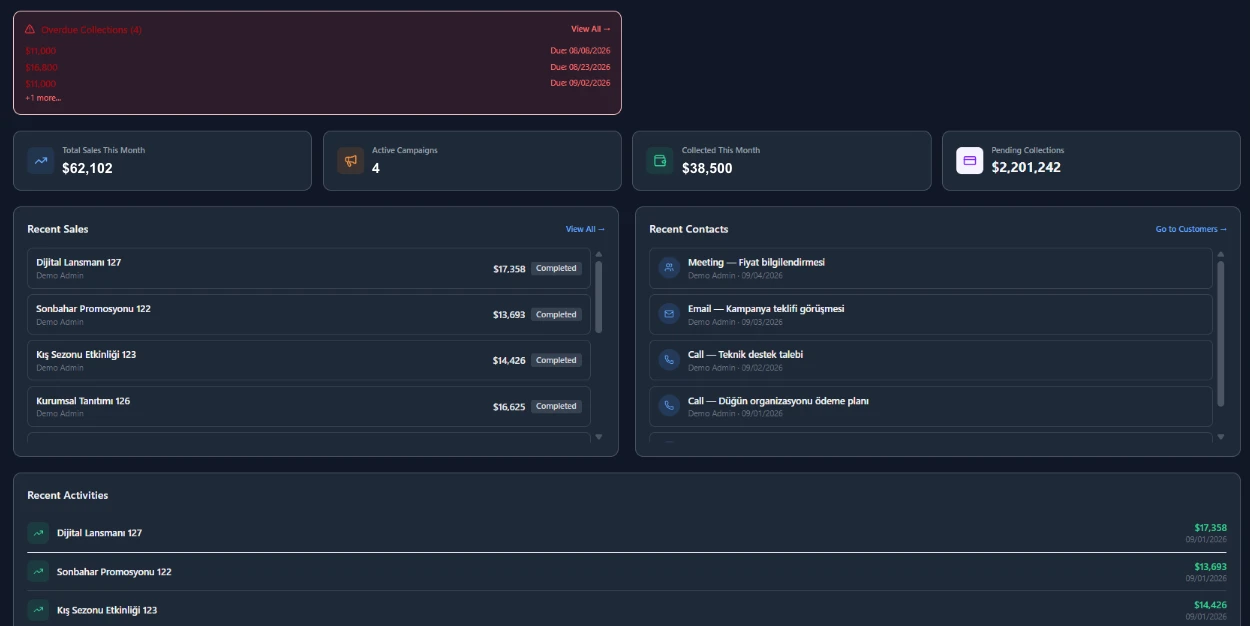
We brought five separate tools into one
- ✓ Proposals & Customers
- ✓ Panels & Occupancy
- ✓ Campaign Calendar
- ✓ Field & Installation
- ✓ Collections
- ✓ Reporting
All on one screen, on the same data — nothing to keep in sync by hand.
The operation lives in four different places
Which panel is free, which one's booked — the latest spreadsheet, or the one before it?
A campaign end date slips, and the client notices their panel still shows the old ad.
Collections get tracked in WhatsApp threads — nobody's sure who's paid and who hasn't.
Every step of the operation, one module each
Customers & Proposals
Account records and contact history in one place, with per-rep visibility controlling who sees which client.
Deal Tracking
Stage-based pipeline with probability and estimated value; lost deals get a logged reason for loss analysis.
Campaign Management
Panel assignments are conflict-protected at the database level; an approved proposal becomes a PDF and a finance entry in one click.
Pitch Map
A self-serve pitch page shared via a time-limited link, showing available panels on a map — the rep gets a live notification the moment a client opens it.
Install Approval
The field crew uploads photos via a login-free link and the client gives electronic approval; location data is never sent to the client.
Collections & Balances
Overdue payments are listed automatically and your team gets automatic email and in-app reminders; each client's balance stays current.
Proforma Invoices
Auto-numbered proforma invoices/quote documents, single or bulk PDF download, and export to Excel — an internal tracking document, not a legal e-invoice.
Panels & Occupancy
GPS-tagged list and map views, live occupancy queries by date range, and automatic detection of campaigns about to expire.
Reporting Center
Eight ready-made report tabs — by client, staff, product, field and map — including revenue and occupancy trends, with charts and tables exportable to CSV/Excel in one click.
Double-booking is impossible
Assigning the same panel to two campaigns on the same date is blocked at the database level.
GDPR-ready
Row-level security (RLS) gives full tenant isolation, with data export and permanent deletion support.
Role-based access
Admin, staff and sales-rep roles; a disabled user is locked out instantly.
Privacy mode
One click masks every amount on finance and report screens during a screen share.
Audit trail
Who changed what and when — campaign line items and other key records keep a full revision history. Internal messages stay inside your org too, with activity logs kept throughout.
Easy migration
We move your customer, inventory and campaign data from Excel step by step, with duplicate detection along the way.
Five steps from lead to report
A proposal comes together in minutes with client info and available panels.
An approved proposal turns into a campaign automatically; panel occupancy updates.
The install crew picks up the job, uploads a photo on completion, updates status.
Your team gets automatic reminders for upcoming and overdue payments.
A per-campaign performance report is prepared automatically for you — bring concrete numbers into your sales presentations to make the case.
Two ways in — whichever fits you
Online demo
Fill out the form and our team will call within 1 business day to set up a 20-minute live demo.
- No install or setup required
- A walkthrough with your own data
- No commitment before you decide
Direct / email
If your team is larger or you need a custom setup, write to us directly and we'll put together a proposal.
- Multi-branch / custom integration calls
- A quote by email
- Contract and SLA discussion
Let's set up a 20-minute demo with your team
Fill out the form or write to us directly — whichever works for you.